Astronaut Minimalist Silhouette Vector: A Practical Guide for Creators
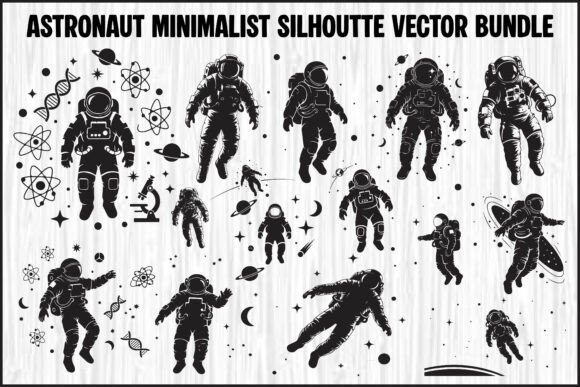
In the crowded landscape of digital design, simplicity often speaks louder than complexity. The Astronaut Minimalist Silhouette Vector has become a staple for designers looking to convey themes of exploration, science, and futurism without visual clutter. These clean, black designs, often paired with subtle space-themed decorative symbols like stars, planets, satellites, atoms, and science icons, offer a versatile foundation for everything from posters and t-shirts to logos and wall art. However, simply downloading a file is rarely enough to guarantee a professional result. Many creators overlook critical details regarding file formats, scalability, and application, leading to projects that look pixelated on print or fail when cut by machines.
Understanding the true value of this specific bundle requires more than just appreciating its aesthetic appeal. It demands a practical approach to how these assets are utilized across different mediums. Whether you are a small business owner launching a new brand, a hobbyist crafting vinyl decals, or a professional marketer designing campaign materials, the difference between a polished final product and a frustrating experience often lies in the technical choices made before the first pixel is placed.
The Trap of Ignoring File Formats
One of the most common mistakes beginners make is assuming all image files are created equal. When you encounter an Astronaut Minimalist Silhouette Vector bundle, you will typically find a mix of EPS, SVG, PNG, and JPG files. While it might be tempting to grab the JPG because it opens instantly in any viewer, doing so can severely limit your project's potential.
JPG files are raster images. They are composed of pixels, which means they have a fixed resolution. If you take a high-quality JPG of an astronaut silhouette intended for a web preview and attempt to stretch it for a large-scale poster or a billboard, the image will blur, pixelate, and lose its crisp edges. This degradation in quality immediately signals "amateur work" to your audience, undermining the professionalism of your brand or project.
To avoid this, you must understand the hierarchy of formats within the bundle:
- EPS Files: These are fully editable vector artwork files compatible with Adobe Illustrator and CorelDRAW. They are essential if you need to recolor the astronaut, separate layers, or resize the design to massive dimensions without losing quality. If you plan on professional print runs, this is your primary file type.
- SVG Files: Scalable Vector Graphics are the gold standard for web use and cutting machines. Unlike EPS, SVGs are natively supported by browsers and software like Cricut Design Space or Silhouette Studio. They maintain clean paths and layered structures, making them ideal for crafts, decals, and vinyl projects where precision cutting is required.
- PNG Files: These high-resolution images feature transparent backgrounds. They are perfect for instant use in digital mockups, website overlays, or social media graphics where you cannot spend time editing out white backgrounds. However, remember they are still raster-based and should not be scaled up beyond their original dimensions.
Selecting the wrong format for your specific task is a costly error. Using a PNG for a large banner or a JPG for a vinyl cut will waste time and money. Always match the file type to the end goal: vectors (EPS/SVG) for scaling and cutting, and rasters (PNG/JPG) for quick digital previews or fixed-size web elements.
Overlooking the Importance of Clean Paths and Layers
Even when using the correct vector format, the internal structure of the file matters immensely. A poorly constructed vector file may appear fine at first glance but can cause significant issues during production. For instance, if you are using the Astronaut Minimalist Silhouette Vector for a heat transfer vinyl (HTV) project, complex or overlapping paths can confuse your cutting machine.
Machines like Cricut and Silhouette rely on distinct, non-overlapping lines to determine where to cut. If the vector file contains stray points, open paths, or unnecessary anchor points, the blade may wander, resulting in jagged edges or incomplete cuts. This is particularly relevant for intricate details like the atoms, satellites, or planetary rings often included in these bundles.
A better approach is to inspect the file before sending it to production. Open the SVG or EPS file in your design software and check for:
- Layer Organization: Are the astronaut, the stars, and the planets on separate layers? This allows you to easily hide elements or change colors individually without affecting the whole design.
- Closed Paths: Ensure every shape is a closed loop. Open paths can lead to fill errors in printing software or cut failures in vinyl machines.
- Anchor Point Density: Excessive anchor points can slow down processing and create wobbly lines when scaled. A clean, minimalist design should have smooth curves with minimal points.
By taking the time to verify these structural details, you ensure that your design translates perfectly from the screen to the physical world. This step alone can save hours of troubleshooting and prevent wasted material costs.
Misjudging the Context of Minimalism
Another frequent oversight involves the application of the design itself. The term "minimalist" implies a reduction to the essentials, but this does not mean the design should be sparse to the point of being invisible. When applying an Astronaut Minimalist Silhouette Vector to a busy background or a crowded layout, the clean black design can get lost.
Designers sometimes place these silhouettes on textured or patterned backgrounds without considering contrast. Because the silhouette relies on negative space and solid shapes, a low-contrast background can render the astronaut indistinguishable. This is a common mistake in t-shirt designs where the fabric color clashes with the graphic, or in web headers where the background image competes with the icon.
To achieve a striking result, prioritize contrast and spacing. If the background is dark, consider inverting the silhouette to white or a bright accent color. If the background is busy, add a solid block of color behind the astronaut to frame it. Remember that the power of this style lies in its clarity; do not let poor placement dilute its impact.
Evaluating Your Needs Before Downloading
Before committing to purchasing or downloading a bundle, it is wise to assess your specific requirements. Do you truly need all 15 variations included in the package? While having options is beneficial, managing a large library of unused files can clutter your workflow. More importantly, verify that the license covers your intended use.
If you are a freelancer creating a logo for a client, ensure the license permits commercial resale. If you are a blogger using the image for a post, check if attribution is required. Understanding these terms prevents legal headaches down the road. Additionally, confirm compatibility with your current software stack. If you only use free tools like Inkscape, ensure the EPS files are compatible or that the SVGs are robust enough for your needs.
Finally, consider the long-term utility of the design. A well-structured Astronaut Minimalist Silhouette Vector bundle offers longevity. You can adapt the same core assets for a holiday sale, a science fair poster, or a merchandise line years later. Investing time in understanding the file capabilities now ensures that these assets remain a valuable part of your creative toolkit for the future.
By avoiding these common pitfalls—choosing the right file format, verifying path integrity, ensuring visual contrast, and understanding licensing—you transform a simple download into a powerful design asset. The result is a project that looks professional, functions correctly, and communicates your message with the clarity and elegance that minimalist design promises.